
ALT Codes for Windows. Full list of ALT key codes for special characters and symbols. Learn How to use Alt Key Codes?
| Symbol | Code | Symbol | Code | Symbol | Code | Symbol | Code | Symbol | Code | Symbol | Code |
|---|---|---|---|---|---|---|---|---|---|---|---|
| ☺ | 1 | ☻ | 2 | ♥ | 3 | ♦ | 4 | ♣ | 5 | ♠ | 6 |
| • | 7 | ◘ | 8 | ○ | 9 | ◙ | 10 | ♂ | 11 | ♀ | 12 |
| ♪ | 13 | ♫ | 14 | ☼ | 15 | ► | 16 | ◄ | 17 | ↕ | 18 |
| ‼ | 19 | ¶ | 20 | § | 21 | ▬ | 22 | ↨ | 23 | ↑ | 24 |
| ↓ | 25 | → | 26 | ← | 27 | ∟ | 28 | ↔ | 29 | ▲ | 30 |
| ▼ | 31 | spc | 32 | ! | 33 | " | 34 | # | 35 | $ | 36 |
| % | 37 | & | 38 | ' | 39 | ( | 40 | ) | 41 | * | 42 |
| + | 43 | , | 44 | – | 45 | . | 46 | / | 47 | 0 | 48 |
| 1 | 49 | 2 | 50 | 3 | 51 | 4 | 52 | 5 | 53 | 6 | 54 |
| 7 | 55 | 8 | 56 | 9 | 57 | : | 58 | ; | 59 | < | 60 |
| = | 61 | > | 62 | ? | 63 | @ | 64 | A | 65 | B | 66 |
| C | 67 | D | 68 | E | 69 | F | 70 | G | 71 | H | 72 |
| I | 73 | J | 74 | K | 75 | L | 76 | M | 77 | N | 78 |
| O | 79 | P | 80 | Q | 81 | R | 82 | S | 83 | T | 84 |
| U | 85 | V | 86 | W | 87 | X | 88 | Y | 89 | Z | 90 |
| [ | 91 | \ | 92 | ] | 93 | ^ | 94 | _ | 95 | ` | 96 |
| a | 97 | b | 98 | c | 99 | d | 100 | e | 101 | f | 102 |
| g | 103 | h | 104 | i | 105 | j | 106 | k | 107 | l | 108 |
| m | 109 | n | 110 | o | 111 | p | 112 | q | 113 | r | 114 |
| s | 115 | t | 116 | u | 117 | v | 118 | w | 119 | x | 120 |
| y | 121 | z | 122 | { | 123 | | | 124 | } | 125 | ~ | 126 |
| ⌂ | 127 | Ç | 128 | ü | 129 | é | 130 | â | 131 | ä | 132 |
| à | 133 | å | 134 | ç | 135 | ê | 136 | ë | 137 | è | 138 |
| ï | 139 | î | 140 | ì | 141 | Ä | 142 | Å | 143 | É | 144 |
| æ | 145 | Æ | 146 | ô | 147 | ö | 148 | ò | 149 | û | 150 |
| ù | 151 | ÿ | 152 | Ö | 153 | Ü | 154 | ¢ | 155 | £ | 156 |
| ¥ | 157 | ₧ | 158 | ƒ | 159 | á | 160 | í | 161 | ó | 162 |
| ú | 163 | ñ | 164 | Ñ | 165 | ª | 166 | º | 167 | ¿ | 168 |
| ⌐ | 169 | ¬ | 170 | ½ | 171 | ¼ | 172 | ¡ | 173 | « | 174 |
| » | 175 | ░ | 176 | ▒ | 177 | ▓ | 178 | │ | 179 | ┤ | 180 |
| ╡ | 181 | ╢ | 182 | ╖ | 183 | ╕ | 184 | ╣ | 185 | ║ | 186 |
| ╗ | 187 | ╝ | 188 | ╜ | 189 | ╛ | 190 | ┐ | 191 | └ | 192 |
| ┴ | 193 | ┬ | 194 | ├ | 195 | ─ | 196 | ┼ | 197 | ╞ | 198 |
| ╟ | 199 | ╚ | 200 | ╔ | 201 | ╩ | 202 | ╦ | 203 | ╠ | 204 |
| ═ | 205 | ╬ | 206 | ╧ | 207 | ╨ | 208 | ╤ | 209 | ╥ | 210 |
| ╙ | 211 | ╘ | 212 | ╒ | 213 | ╓ | 214 | ╫ | 215 | ╪ | 216 |
| ┘ | 217 | ┌ | 218 | █ | 219 | ▄ | 220 | ▌ | 221 | ▐ | 222 |
| ▀ | 223 | α | 224 | ß | 225 | Γ | 226 | π | 227 | Σ | 228 |
| σ | 229 | µ | 230 | τ | 231 | Φ | 232 | Θ | 233 | Ω | 234 |
| δ | 235 | ∞ | 236 | φ | 237 | ε | 238 | ∩ | 239 | ≡ | 240 |
| ± | 241 | ≥ | 242 | ≤ | 243 | ⌠ | 244 | ⌡ | 245 | ÷ | 246 |
| ≈ | 247 | ° | 248 | ∙ | 249 | · | 250 | √ | 251 | ⁿ | 252 |
| ² | 253 | ■ | 254 | spc | 255 | ||||||
| Extended ALT Codes (type a leading zero, e.g. Alt + 0128) | |||||||||||
| € | 0128 | ‚ | 0130 | ƒ | 0131 | „ | 0132 | … | 0133 | † | 0134 |
| ‡ | 0135 | ˆ | 0136 | ‰ | 0137 | Š | 0138 | ‹ | 0139 | Œ | 0140 |
| Ž | 0142 | ‘ | 0145 | ’ | 0146 | “ | 0147 | ” | 0148 | • | 0149 |
| – | 0150 | — | 0151 | ˜ | 0152 | ™ | 0153 | š | 0154 | › | 0155 |
| œ | 0156 | ž | 0158 | Ÿ | 0159 | spc | 0160 | ¡ | 0161 | ¢ | 0162 |
| £ | 0163 | ¤ | 0164 | ¥ | 0165 | ¦ | 0166 | § | 0167 | ¨ | 0168 |
| © | 0169 | ª | 0170 | « | 0171 | ¬ | 0172 | ® | 0174 | ¯ | 0175 |
| ° | 0176 | ± | 0177 | ² | 0178 | ³ | 0179 | ´ | 0180 | µ | 0181 |
| ¶ | 0182 | · | 0183 | ¸ | 0184 | ¹ | 0185 | º | 0186 | » | 0187 |
| ¼ | 0188 | ½ | 0189 | ¾ | 0190 | ¿ | 0191 | À | 0192 | Á | 0193 |
| Â | 0194 | Ã | 0195 | Ä | 0196 | Å | 0197 | Æ | 0198 | Ç | 0199 |
| È | 0200 | É | 0201 | Ê | 0202 | Ë | 0203 | Ì | 0204 | Í | 0205 |
| Î | 0206 | Ï | 0207 | Ð | 0208 | Ñ | 0209 | Ò | 0210 | Ó | 0211 |
| Ô | 0212 | Õ | 0213 | Ö | 0214 | × | 0215 | Ø | 0216 | Ù | 0217 |
| Ú | 0218 | Û | 0219 | Ü | 0220 | Ý | 0221 | Þ | 0222 | ß | 0223 |
| à | 0224 | á | 0225 | â | 0226 | ã | 0227 | ä | 0228 | å | 0229 |
| æ | 0230 | ç | 0231 | è | 0232 | é | 0233 | ê | 0234 | ë | 0235 |
| ì | 0236 | í | 0237 | î | 0238 | ï | 0239 | ð | 0240 | ñ | 0241 |
| ò | 0242 | ó | 0243 | ô | 0244 | õ | 0245 | ö | 0246 | ÷ | 0247 |
| ø | 0248 | ù | 0249 | ú | 0250 | û | 0251 | ü | 0252 | ý | 0253 |
| þ | 0254 | ÿ | 0255 | ||||||||
Tip: click any symbol to copy it instantly. Codes 1 to 255 are the classic set, codes starting with 0 are the extended ANSI set.
How to Use Alt Codes in Windows (and Apple Devices)
On Windows, hold down the Alt key, type the number code on the numeric keypad (the separate block of number keys on the right, with Num Lock turned on), then release the Alt key. The special character appears instantly. The top row of numbers above the letters will not work for Alt codes, you must use the numeric keypad.
On a laptop without a numpad, hold Fn + Alt and use the hidden embedded number keys (often printed in a second color on the M, J, K, L, U, I, O, 7, 8, 9 keys), or open the On-Screen Keyboard, or use Character Map (charmap.exe). The easiest option on any device is to just click a symbol in the table above to copy and paste it.
On a Mac, Windows Alt codes do not work. Macs use the Option key instead, for example Option + e then e gives e with an acute accent, and Option + 2 gives the trademark symbol. The simplest cross-platform method is copy and paste, which works the same on Windows, Mac, iPhone, iPad, Android, and Chromebook.
Check Marks and Tick Symbols
Check mark and tick symbols for lists, forms, and surveys. Click any symbol to copy and paste it, or use the Alt code shown.
| Alt Code | Symbol | Description | Keyboard Shortcut |
|---|---|---|---|
| Alt + 10003 | ✓ | Check mark, Tick Copy and Paste | Alt + 10003 or copy and paste |
| Alt + 10004 | ✔ | Heavy check mark Copy and Paste | Alt + 10004 or copy and paste |
| Alt + 10007 | ✗ | Ballot X, Cross mark Copy and Paste | Alt + 10007 or copy and paste |
| Alt + 10008 | ✘ | Heavy ballot X Copy and Paste | Alt + 10008 or copy and paste |
| Alt + 9745 | ☑ | Checked ballot box, Checkbox Copy and Paste | Alt + 9745 or copy and paste |
| Alt + 9744 | ☐ | Empty ballot box, Unchecked box | Alt + 9744 or copy and paste |
| Alt + 9989 | ✅ | Green check mark emoji Copy and Paste | Copy and paste (emoji) |
| Alt + 10060 | ❌ | Cross mark emoji, Red X Copy and Paste | Copy and paste (emoji) |
Less Than and Greater Than Symbols
Less than, greater than, and comparison symbols for math and coding. Copy and paste any symbol below or type its Alt code.
| Alt Code | Symbol | Description | Keyboard Shortcut |
|---|---|---|---|
| Alt + 60 | < | Less than sign Copy and Paste | Alt + 60 |
| Alt + 62 | > | Greater than sign Copy and Paste | Alt + 62 |
| Alt + 8804 | ≤ | Less than or equal to Copy and Paste | Alt + 8804 or copy and paste |
| Alt + 8805 | ≥ | Greater than or equal to Copy and Paste | Alt + 8805 or copy and paste |
| Alt + 8800 | ≠ | Not equal to sign Copy and Paste | Alt + 8800 or copy and paste |
| Alt + 0171 | « | Left double angle quote (less than style) | Alt + 0171 |
| Alt + 0187 | » | Right double angle quote (greater than style) | Alt + 0187 |
| Alt + 0139 | ‹ | Single left angle quote | Alt + 0139 |
| Alt + 0155 | › | Single right angle quote | Alt + 0155 |
| Alt + 8810 | ≪ | Much less than | Alt + 8810 or copy and paste |
| Alt + 8811 | ≫ | Much greater than | Alt + 8811 or copy and paste |
Math Symbols (including Square Root)
Math symbols including the square root sign, division, multiplication, infinity, pi, and fractions. Copy and paste or use the Alt code.
| Alt Code | Symbol | Description | Keyboard Shortcut |
|---|---|---|---|
| Alt + 251 | √ | Square root sign, Radical Copy and Paste | Alt + 251 |
| Alt + 8731 | ∛ | Cube root Copy and Paste | Alt + 8731 or copy and paste |
| Alt + 0247 | ÷ | Division sign Copy and Paste | Alt + 0247 |
| Alt + 0215 | × | Multiplication sign, Times Copy and Paste | Alt + 0215 |
| Alt + 241 | ± | Plus or minus sign Copy and Paste | Alt + 241 |
| Alt + 247 | ≈ | Approximately equal to | Alt + 247 |
| Alt + 236 | ∞ | Infinity sign Copy and Paste | Alt + 236 |
| Alt + 227 | π | Pi symbol Copy and Paste | Alt + 227 |
| Alt + 228 | Σ | Sigma, Sum sign Copy and Paste | Alt + 228 |
| Alt + 230 | µ | Micro sign, Mu Copy and Paste | Alt + 230 |
| Alt + 234 | Ω | Omega sign Copy and Paste | Alt + 234 |
| Alt + 248 | ° | Degree sign Copy and Paste | Alt + 248 or Alt + 0176 |
| Alt + 0178 | ² | Squared, Superscript two | Alt + 0178 |
| Alt + 0179 | ³ | Cubed, Superscript three | Alt + 0179 |
| Alt + 8734 | ∑ | N-ary summation (large sigma) | Alt + 8721 or copy and paste |
| Alt + 8747 | ∫ | Integral sign Copy and Paste | Alt + 8747 or copy and paste |
| Alt + 0188 | ¼ | One quarter fraction | Alt + 0188 |
| Alt + 0189 | ½ | One half fraction | Alt + 0189 |
| Alt + 0190 | ¾ | Three quarters fraction | Alt + 0190 |
| Alt + 0137 | ‰ | Per mille sign (per thousand) | Alt + 0137 |
Arrow Symbols (Up, Down, Left, Right)
Arrow symbols for directions and navigation. Up Arrow Copy and Paste, Down Arrow, Left Arrow, and Right Arrow are all below.
| Alt Code | Symbol | Description | Keyboard Shortcut |
|---|---|---|---|
| Alt + 24 | ↑ | Up Arrow Copy and Paste | Alt + 24 |
| Alt + 25 | ↓ | Down Arrow Copy and Paste | Alt + 25 |
| Alt + 26 | → | Right Arrow Copy and Paste | Alt + 26 |
| Alt + 27 | ← | Left Arrow Copy and Paste | Alt + 27 |
| Alt + 29 | ↔ | Left Right Arrow Copy and Paste | Alt + 29 |
| Alt + 18 | ↕ | Up Down Arrow Copy and Paste | Alt + 18 |
| Alt + 16 | ► | Right pointer, Play arrow | Alt + 16 |
| Alt + 17 | ◄ | Left pointer arrow | Alt + 17 |
| Alt + 8593 | ↑ | Upwards arrow (Unicode) Copy and Paste | Alt + 8593 or copy and paste |
| Alt + 8594 | → | Rightwards arrow (Unicode) Copy and Paste | Alt + 8594 or copy and paste |
| Alt + 8658 | ⇒ | Rightwards double arrow Copy and Paste | Alt + 8658 or copy and paste |
| Alt + 8656 | ⇐ | Leftwards double arrow | Alt + 8656 or copy and paste |
| Alt + 8657 | ⇑ | Upwards double arrow | Alt + 8657 or copy and paste |
| Alt + 8659 | ⇓ | Downwards double arrow | Alt + 8659 or copy and paste |
| Alt + 8599 | ↗ | North East arrow (up right) | Alt + 8599 or copy and paste |
| Alt + 8600 | ↘ | South East arrow (down right) | Alt + 8600 or copy and paste |
Heart Symbols
Heart symbols and card suits. Heart Copy and Paste, hollow heart, and the classic card symbols are listed below.
| Alt Code | Symbol | Description | Keyboard Shortcut |
|---|---|---|---|
| Alt + 3 | ♥ | Heart symbol, Solid heart Copy and Paste | Alt + 3 |
| Alt + 9825 | ♡ | Hollow heart, Open heart Copy and Paste | Alt + 9825 or copy and paste |
| Alt + 10084 | ❤︎ | Heavy black heart Copy and Paste | Copy and paste |
| Alt + 10084 | ❤️ | Red heart emoji (color) Copy and Paste | Copy and paste (emoji) |
| Alt + 4 | ♦ | Diamond suit Copy and Paste | Alt + 4 |
| Alt + 5 | ♣ | Club suit Copy and Paste | Alt + 5 |
| Alt + 6 | ♠ | Spade suit Copy and Paste | Alt + 6 |
Music Note Symbols
Music note symbols including the single note, beamed notes, flat, and sharp signs. Copy and paste or use the Alt code.
| Alt Code | Symbol | Description | Keyboard Shortcut |
|---|---|---|---|
| Alt + 13 | ♪ | Music note, Eighth note Copy and Paste | Alt + 13 |
| Alt + 14 | ♫ | Beamed notes, Double music note Copy and Paste | Alt + 14 |
| Alt + 9834 | ♪ | Quaver note (Unicode) Copy and Paste | Alt + 9834 or copy and paste |
| Alt + 9835 | ♫ | Beamed eighth notes Copy and Paste | Alt + 9835 or copy and paste |
| Alt + 9836 | ♬ | Beamed sixteenth notes Copy and Paste | Alt + 9836 or copy and paste |
| Alt + 9837 | ♭ | Flat sign Copy and Paste | Alt + 9837 or copy and paste |
| Alt + 9839 | ♯ | Sharp sign Copy and Paste | Alt + 9839 or copy and paste |
Accent Letters (Letters with Accents)
Accented letters for Spanish, French, German, Italian, and more. Every letter below can be copied and pasted, or typed with its Windows Alt code or Mac Option shortcut. For a full A to Z breakdown of letters with accents, see our individual letter pages across letteraccents.com.
| Alt Code | Symbol | Description | Keyboard Shortcut |
|---|---|---|---|
| Alt + 0233 | é | Lowercase e with acute accent, e with accent Copy and Paste | Alt + 0233 (Win), Option + e then e (Mac) |
| Alt + 0201 | É | Capital E with acute accent Copy and Paste | Alt + 0201 (Win), Option + e then Shift+E (Mac) |
| Alt + 0225 | á | Lowercase a with acute accent Copy and Paste | Alt + 0225 (Win), Option + e then a (Mac) |
| Alt + 0237 | í | Lowercase i with acute accent Copy and Paste | Alt + 0237 (Win), Option + e then i (Mac) |
| Alt + 0243 | ó | Lowercase o with acute accent Copy and Paste | Alt + 0243 (Win), Option + e then o (Mac) |
| Alt + 0250 | ú | Lowercase u with acute accent Copy and Paste | Alt + 0250 (Win), Option + e then u (Mac) |
| Alt + 0241 | ñ | Lowercase n with tilde Copy and Paste | Alt + 0241 (Win), Option + n then n (Mac) |
| Alt + 0231 | ç | Lowercase c with cedilla Copy and Paste | Alt + 0231 (Win), Option + c (Mac) |
| Alt + 0252 | ü | Lowercase u with umlaut Copy and Paste | Alt + 0252 (Win), Option + u then u (Mac) |
| Alt + 0228 | ä | Lowercase a with umlaut Copy and Paste | Alt + 0228 (Win), Option + u then a (Mac) |
| Alt + 0246 | ö | Lowercase o with umlaut Copy and Paste | Alt + 0246 (Win), Option + u then o (Mac) |
| Alt + 0224 | à | Lowercase a with grave accent Copy and Paste | Alt + 0224 (Win), Option + ` then a (Mac) |
| Alt + 0232 | è | Lowercase e with grave accent Copy and Paste | Alt + 0232 (Win), Option + ` then e (Mac) |
| Alt + 0226 | â | Lowercase a with circumflex Copy and Paste | Alt + 0226 (Win), Option + i then a (Mac) |
| Alt + 0234 | ê | Lowercase e with circumflex Copy and Paste | Alt + 0234 (Win), Option + i then e (Mac) |
Spanish Letters with Accents
Spanish accent marks and special characters, including the n with tilde (enye), accented vowels, and the inverted question and exclamation marks. Copy and paste any Spanish letter or type its Alt code.
| Alt Code | Symbol | Description | Keyboard Shortcut |
|---|---|---|---|
| Alt + 0225 | á | Lowercase a with acute, a with accent Copy and Paste | Option + e then a (Mac) |
| Alt + 0233 | é | Lowercase e with acute, e with accent Copy and Paste | Option + e then e (Mac) |
| Alt + 0237 | í | Lowercase i with acute, i with accent Copy and Paste | Option + e then i (Mac) |
| Alt + 0243 | ó | Lowercase o with acute, o with accent Copy and Paste | Option + e then o (Mac) |
| Alt + 0250 | ú | Lowercase u with acute, u with accent Copy and Paste | Option + e then u (Mac) |
| Alt + 0193 | Á | Capital A with acute accent Copy and Paste | Option + e then Shift+A (Mac) |
| Alt + 0201 | É | Capital E with acute accent Copy and Paste | Option + e then Shift+E (Mac) |
| Alt + 0205 | Í | Capital I with acute accent Copy and Paste | Option + e then Shift+I (Mac) |
| Alt + 0211 | Ó | Capital O with acute accent Copy and Paste | Option + e then Shift+O (Mac) |
| Alt + 0218 | Ú | Capital U with acute accent Copy and Paste | Option + e then Shift+U (Mac) |
| Alt + 0241 | ñ | Lowercase n with tilde (enye) Copy and Paste | Option + n then n (Mac) |
| Alt + 0209 | Ñ | Capital N with tilde (Enye) Copy and Paste | Option + n then Shift+N (Mac) |
| Alt + 0252 | ü | Lowercase u with umlaut (dieresis) Copy and Paste | Option + u then u (Mac) |
| Alt + 0220 | Ü | Capital U with umlaut Copy and Paste | Option + u then Shift+U (Mac) |
| Alt + 0161 | ¡ | Inverted exclamation mark Copy and Paste | Alt + 0161 (Win), Option + 1 (Mac) |
| Alt + 0191 | ¿ | Inverted question mark Copy and Paste | Alt + 0191 (Win), Option + Shift + ? (Mac) |
French Letters with Accents
French accented letters including e with acute (accent aigu), e with grave (accent grave), circumflex, cedilla, and the oe ligature. Copy and paste or use the Alt code shown.
| Alt Code | Symbol | Description | Keyboard Shortcut |
|---|---|---|---|
| Alt + 0233 | é | Lowercase e with acute (e accent aigu) Copy and Paste | Option + e then e (Mac) |
| Alt + 0232 | è | Lowercase e with grave (e accent grave) Copy and Paste | Option + ` then e (Mac) |
| Alt + 0234 | ê | Lowercase e with circumflex (e accent circonflexe) Copy and Paste | Option + i then e (Mac) |
| Alt + 0235 | ë | Lowercase e with diaeresis (e trema) Copy and Paste | Option + u then e (Mac) |
| Alt + 0224 | à | Lowercase a with grave (a accent grave) Copy and Paste | Option + ` then a (Mac) |
| Alt + 0226 | â | Lowercase a with circumflex Copy and Paste | Option + i then a (Mac) |
| Alt + 0231 | ç | Lowercase c with cedilla (c cedille) Copy and Paste | Option + c (Mac) |
| Alt + 0199 | Ç | Capital C with cedilla Copy and Paste | Option + Shift + c (Mac) |
| Alt + 0238 | î | Lowercase i with circumflex Copy and Paste | Option + i then i (Mac) |
| Alt + 0239 | ï | Lowercase i with diaeresis Copy and Paste | Option + u then i (Mac) |
| Alt + 0244 | ô | Lowercase o with circumflex Copy and Paste | Option + i then o (Mac) |
| Alt + 0251 | û | Lowercase u with circumflex Copy and Paste | Option + i then u (Mac) |
| Alt + 0249 | ù | Lowercase u with grave Copy and Paste | Option + ` then u (Mac) |
| Alt + 0156 | œ | Lowercase oe ligature (oe) Copy and Paste | Option + q (Mac) |
| Alt + 0140 | Π| Capital OE ligature Copy and Paste | Option + Shift + q (Mac) |
| Alt + 0171 | « | Left French quotation mark (guillemet) Copy and Paste | Alt + 0171 (Win), Option + \ (Mac) |
| Alt + 0187 | » | Right French quotation mark (guillemet) Copy and Paste | Alt + 0187 (Win), Option + Shift + \ (Mac) |
German Letters with Accents (German Keyboard)
Common German special characters, the umlauts and the eszett (sharp S). On a German keyboard many of these are direct keys, on other keyboards use the Windows Alt code or copy and paste.
Common German Special Characters
| Alt Code | Symbol | Description | Keyboard Shortcut |
|---|---|---|---|
| Alt + 0196 | Ä | Capital A with umlaut Copy and Paste | Shift + " then A |
| Alt + 0214 | Ö | Capital O with umlaut Copy and Paste | Shift + " then O |
| Alt + 0220 | Ü | Capital U with umlaut Copy and Paste | Shift + " then U |
| Alt + 0228 | ä | Lowercase a with umlaut Copy and Paste | " then a |
| Alt + 0246 | ö | Lowercase o with umlaut Copy and Paste | " then o |
| Alt + 0252 | ü | Lowercase u with umlaut Copy and Paste | " then u |
| Alt + 0223 | ß | Eszett, Sharp S Copy and Paste | Direct key on German keyboard |
| Alt + 0128 | € | Euro sign Copy and Paste | Alt Gr + e |
Additional Characters Available Through a German Keyboard
| Key Combination | Symbol | Description |
|---|---|---|
| ^ then a | â | Lowercase a with circumflex |
| ^ then o | ô | Lowercase o with circumflex |
| ^ then u | û | Lowercase u with circumflex |
| ` then a | à | Lowercase a with grave accent |
| ` then e | è | Lowercase e with grave accent |
| ` then u | ù | Lowercase u with grave accent |
| Alt Gr + q | @ | Commercial at sign |
| Alt Gr + + | ~ | Tilde |
| Alt Gr + < | | | Vertical bar, Pipe |
| Alt Gr + 7 | { | Opening curly bracket |
| Alt Gr + 8 | [ | Opening square bracket |
| Alt Gr + 9 | ] | Closing square bracket |
| Alt Gr + 0 | } | Closing curly bracket |
| Alt Gr + ß | \ | Backslash |
Italian Letters with Accents
Italian accented vowels (lettere accentate) used in everyday Italian writing. On an Italian keyboard most are direct keys, elsewhere use the Alt code or copy and paste.
| Alt Code | Symbol | Description | Keyboard Shortcut |
|---|---|---|---|
| Alt + 0224 | à | Lowercase a with grave (a accentata) Copy and Paste | Direct key on Italian keyboard |
| Alt + 0232 | è | Lowercase e with grave (e accentata) Copy and Paste | Direct key on Italian keyboard |
| Alt + 0233 | é | Lowercase e with acute (e accentata chiusa) Copy and Paste | Shift + e key (Italian keyboard) |
| Alt + 0236 | ì | Lowercase i with grave (i accentata) Copy and Paste | Direct key on Italian keyboard |
| Alt + 0242 | ò | Lowercase o with grave (o accentata) Copy and Paste | Direct key on Italian keyboard |
| Alt + 0243 | ó | Lowercase o with acute Copy and Paste | Alt + 0243 (Win) |
| Alt + 0249 | ù | Lowercase u with grave (u accentata) Copy and Paste | Direct key on Italian keyboard |
| Alt + 0192 | À | Capital A with grave accent Copy and Paste | Shift + a grave key |
| Alt + 0200 | È | Capital E with grave accent Copy and Paste | Shift + e grave key |
| Alt + 0204 | Ì | Capital I with grave accent Copy and Paste | Alt + 0204 (Win) |
Trademark, Copyright and Registered Symbols
Trademark, copyright, registered, and service mark symbols for business and legal text. Copy and paste or type the Alt code.
| Alt Code | Symbol | Description | Keyboard Shortcut |
|---|---|---|---|
| Alt + 0153 | ™ | Trademark symbol, TM Copy and Paste | Alt + 0153 |
| Alt + 0169 | © | Copyright symbol Copy and Paste | Alt + 0169 |
| Alt + 0174 | ® | Registered trademark symbol Copy and Paste | Alt + 0174 |
| Alt + 8480 | ℠ | Service mark, SM Copy and Paste | Alt + 8480 or copy and paste |
| Alt + 8471 | ℗ | Sound recording copyright Copy and Paste | Alt + 8471 or copy and paste |
Money and Currency Symbols
Currency symbols including the Euro, Pound, Yen, Cent, Rupee, Ruble, and Won. Copy and paste any currency sign or use its Alt code.
| Alt Code | Symbol | Description | Keyboard Shortcut |
|---|---|---|---|
| Alt + 0128 | € | Euro sign Copy and Paste | Alt + 0128 |
| Alt + 0163 | £ | Pound sterling sign Copy and Paste | Alt + 0163 |
| Alt + 0165 | ¥ | Yen sign, Yuan Copy and Paste | Alt + 0165 |
| Alt + 0162 | ¢ | Cent sign Copy and Paste | Alt + 0162 |
| Alt + 36 | $ | Dollar sign Copy and Paste | Alt + 36 |
| Alt + 158 | ₧ | Peseta sign | Alt + 158 |
| Alt + 0164 | ¤ | Generic currency sign | Alt + 0164 |
| Alt + 0131 | ƒ | Florin, Dutch guilder sign | Alt + 0131 |
| Alt + 8377 | ₹ | Indian Rupee sign Copy and Paste | Alt + 8377 or copy and paste |
| Alt + 8381 | ₽ | Russian Ruble sign Copy and Paste | Alt + 8381 or copy and paste |
| Alt + 8361 | ₩ | Korean Won sign Copy and Paste | Alt + 8361 or copy and paste |
Male and Female Symbols (Gender Symbols)
Male, female, and other gender symbols. Copy and paste or type the Alt code shown.
| Alt Code | Symbol | Description | Keyboard Shortcut |
|---|---|---|---|
| Alt + 11 | ♂ | Male sign, Mars symbol Copy and Paste | Alt + 11 |
| Alt + 12 | ♀ | Female sign, Venus symbol Copy and Paste | Alt + 12 |
| Alt + 9893 | ⚥ | Male and female sign Copy and Paste | Alt + 9893 or copy and paste |
| Alt + 9894 | ⚦ | Male with stroke (transgender) Copy and Paste | Copy and paste |
| Alt + 9890 | ⚢ | Doubled female sign Copy and Paste | Copy and paste |
| Alt + 9891 | ⚣ | Doubled male sign Copy and Paste | Copy and paste |
Shape Symbols
Shape symbols including squares, circles, triangles, stars, and diamonds. Copy and paste or use the Alt code.
| Alt Code | Symbol | Description | Keyboard Shortcut |
|---|---|---|---|
| Alt + 254 | ■ | Black square, Filled square Copy and Paste | Alt + 254 |
| Alt + 9633 | □ | White square, Empty square Copy and Paste | Alt + 9633 or copy and paste |
| Alt + 9 | ○ | White circle Copy and Paste | Alt + 9 |
| Alt + 8 | ◘ | Inverse bullet Copy and Paste | Alt + 8 |
| Alt + 30 | ▲ | Black up triangle Copy and Paste | Alt + 30 |
| Alt + 31 | ▼ | Black down triangle Copy and Paste | Alt + 31 |
| Alt + 9679 | ● | Black circle, Filled dot Copy and Paste | Alt + 9679 or copy and paste |
| Alt + 9733 | ★ | Black star, Solid star Copy and Paste | Alt + 9733 or copy and paste |
| Alt + 9734 | ☆ | White star, Outline star Copy and Paste | Alt + 9734 or copy and paste |
| Alt + 9632 | ■ | Filled square (Unicode) | Alt + 9632 or copy and paste |
| Alt + 9670 | ◆ | Black diamond Copy and Paste | Alt + 9670 or copy and paste |
Greek Letter Symbols
Greek letters used in math, science, and engineering, including pi, sigma, omega, and delta. Copy and paste or type the Alt code.
| Alt Code | Symbol | Description | Keyboard Shortcut |
|---|---|---|---|
| Alt + 224 | α | Alpha (lowercase) Copy and Paste | Alt + 224 |
| Alt + 225 | ß | Beta look-alike (Eszett) | Alt + 225 |
| Alt + 226 | Γ | Gamma (uppercase) Copy and Paste | Alt + 226 |
| Alt + 227 | π | Pi (lowercase) Copy and Paste | Alt + 227 |
| Alt + 228 | Σ | Sigma (uppercase) Copy and Paste | Alt + 228 |
| Alt + 229 | σ | Sigma (lowercase) Copy and Paste | Alt + 229 |
| Alt + 230 | µ | Mu, Micro sign Copy and Paste | Alt + 230 |
| Alt + 231 | τ | Tau (lowercase) Copy and Paste | Alt + 231 |
| Alt + 232 | Φ | Phi (uppercase) Copy and Paste | Alt + 232 |
| Alt + 233 | Θ | Theta (uppercase) Copy and Paste | Alt + 233 |
| Alt + 234 | Ω | Omega (uppercase) Copy and Paste | Alt + 234 |
| Alt + 235 | δ | Delta (lowercase) Copy and Paste | Alt + 235 |
| Alt + 237 | φ | Phi (lowercase) Copy and Paste | Alt + 237 |
| Alt + 238 | ε | Epsilon (lowercase) Copy and Paste | Alt + 238 |
Punctuation and General Symbols
Common punctuation and text symbols including the bullet point, section sign, ellipsis, dashes, curly quotes, and inverted marks. Copy and paste or use the Alt code.
| Alt Code | Symbol | Description | Keyboard Shortcut |
|---|---|---|---|
| Alt + 0167 | § | Section sign Copy and Paste | Alt + 0167 |
| Alt + 20 | ¶ | Pilcrow, Paragraph sign Copy and Paste | Alt + 20 or Alt + 0182 |
| Alt + 7 | • | Bullet point Copy and Paste | Alt + 7 or Alt + 0149 |
| Alt + 0133 | … | Ellipsis (three dots) Copy and Paste | Alt + 0133 |
| Alt + 0150 | – | En dash Copy and Paste | Alt + 0150 |
| Alt + 0151 | — | Long dash Copy and Paste | Alt + 0151 |
| Alt + 0145 | ‘ | Left single quote Copy and Paste | Alt + 0145 |
| Alt + 0146 | ’ | Right single quote, Apostrophe Copy and Paste | Alt + 0146 |
| Alt + 0147 | “ | Left double quote Copy and Paste | Alt + 0147 |
| Alt + 0148 | ” | Right double quote Copy and Paste | Alt + 0148 |
| Alt + 0134 | † | Dagger sign Copy and Paste | Alt + 0134 |
| Alt + 0135 | ‡ | Double dagger sign Copy and Paste | Alt + 0135 |
| Alt + 0161 | ¡ | Inverted exclamation mark Copy and Paste | Alt + 0161 or Alt + 173 |
| Alt + 0191 | ¿ | Inverted question mark Copy and Paste | Alt + 0191 or Alt + 168 |
| Alt + 0176 | ° | Degree sign Copy and Paste | Alt + 0176 or Alt + 248 |
Fun Emojis and Smiley Symbols
Classic smiley faces plus modern emojis you can copy and paste anywhere. The old Alt code smileys work on Windows, and the color emojis work everywhere by copy and paste.
| Alt Code | Symbol | Description | Keyboard Shortcut |
|---|---|---|---|
| Alt + 1 | ☺ | White smiley face Copy and Paste | Alt + 1 |
| Alt + 2 | ☻ | Black smiley face Copy and Paste | Alt + 2 |
| Alt + 15 | ☼ | Sun with rays symbol Copy and Paste | Alt + 15 |
| Alt + 128512 | 😀 | Grinning face emoji Copy and Paste | Copy and paste (emoji) |
| Alt + 128514 | 😂 | Face with tears of joy emoji Copy and Paste | Copy and paste (emoji) |
| Alt + 129315 | 🤣 | Rolling on the floor laughing emoji Copy and Paste | Copy and paste (emoji) |
| Alt + 128522 | 😊 | Smiling face with smiling eyes emoji Copy and Paste | Copy and paste (emoji) |
| Alt + 128517 | 😅 | Grinning face with sweat emoji Copy and Paste | Copy and paste (emoji) |
| Alt + 128525 | 😍 | Smiling face with heart eyes emoji Copy and Paste | Copy and paste (emoji) |
| Alt + 129392 | 🥰 | Smiling face with hearts emoji Copy and Paste | Copy and paste (emoji) |
| Alt + 128536 | 😘 | Face blowing a kiss emoji Copy and Paste | Copy and paste (emoji) |
| Alt + 128526 | 😎 | Smiling face with sunglasses emoji Copy and Paste | Copy and paste (emoji) |
| Alt + 129300 | 🤔 | Thinking face emoji Copy and Paste | Copy and paste (emoji) |
| Alt + 128519 | 😇 | Smiling face with halo emoji Copy and Paste | Copy and paste (emoji) |
| Alt + 129321 | 🤩 | Star struck emoji Copy and Paste | Copy and paste (emoji) |
| Alt + 129395 | 🥳 | Partying face emoji Copy and Paste | Copy and paste (emoji) |
| Alt + 128540 | 😜 | Winking face with tongue emoji Copy and Paste | Copy and paste (emoji) |
| Alt + 127881 | 🎉 | Party popper emoji Copy and Paste | Copy and paste (emoji) |
| Alt + 128546 | 😢 | Crying face emoji Copy and Paste | Copy and paste (emoji) |
| Alt + 128557 | 😭 | Loudly crying face emoji Copy and Paste | Copy and paste (emoji) |
| Alt + 128580 | 🙄 | Face with rolling eyes emoji Copy and Paste | Copy and paste (emoji) |
| Alt + 128077 | 👍 | Thumbs up emoji Copy and Paste | Copy and paste (emoji) |
| Alt + 128079 | 👏 | Clapping hands emoji Copy and Paste | Copy and paste (emoji) |
| Alt + 128591 | 🙏 | Folded hands (please / thank you) emoji Copy and Paste | Copy and paste (emoji) |
| Alt + 128170 | 💪 | Flexed biceps emoji Copy and Paste | Copy and paste (emoji) |
| Alt + 128064 | 👀 | Eyes emoji Copy and Paste | Copy and paste (emoji) |
| Alt + 128293 | 🔥 | Fire emoji Copy and Paste | Copy and paste (emoji) |
| Alt + 128175 | 💯 | Hundred points emoji Copy and Paste | Copy and paste (emoji) |
| Alt + 10024 | ✨ | Sparkles emoji Copy and Paste | Copy and paste (emoji) |
| Alt + 127752 | 🌈 | Rainbow emoji Copy and Paste | Copy and paste (emoji) |
What Are Alt Codes?
Alt codes are a Windows shortcut method for typing special characters and symbols that are not printed on your keyboard. You hold the Alt key, type a number on the numeric keypad, and release Alt to produce the character. They were inherited from the original IBM PC and are still built into Windows today.
How Alt codes work: hold down the Alt key, type a specific number sequence on your numeric keypad (NumPad), then release the Alt key. You must have Num Lock turned on, and you must use the separate numeric keypad on the right side of your keyboard rather than the number row across the top.
Two types of Alt codes:
- Standard codes (1 to 3 digits): these map to the legacy OEM character set (Code Page 437) and produce symbols like hearts (Alt + 3), smiley faces (Alt + 1), and box drawing lines.
- Extended codes (with a leading zero, for example 0128 to 0255): these map to the Windows ANSI character set and produce accented letters (Alt + 0233 gives e with acute), currency symbols (Alt + 0128 gives the Euro), and math signs (Alt + 0177 gives plus or minus).
How to Print an ALT Symbol Using the Keyboard
To print an Alt symbol using the keyboard, make sure Num Lock is on, hold the Alt key, type the full code on the numeric keypad (include the leading zero for extended codes), then let go of Alt. The symbol prints wherever your cursor is. If nothing appears, your keyboard layout may lack a numeric keypad, in which case use the On-Screen Keyboard, Character Map, or copy and paste from the tables above.
How to Print the ALT Code Sheet
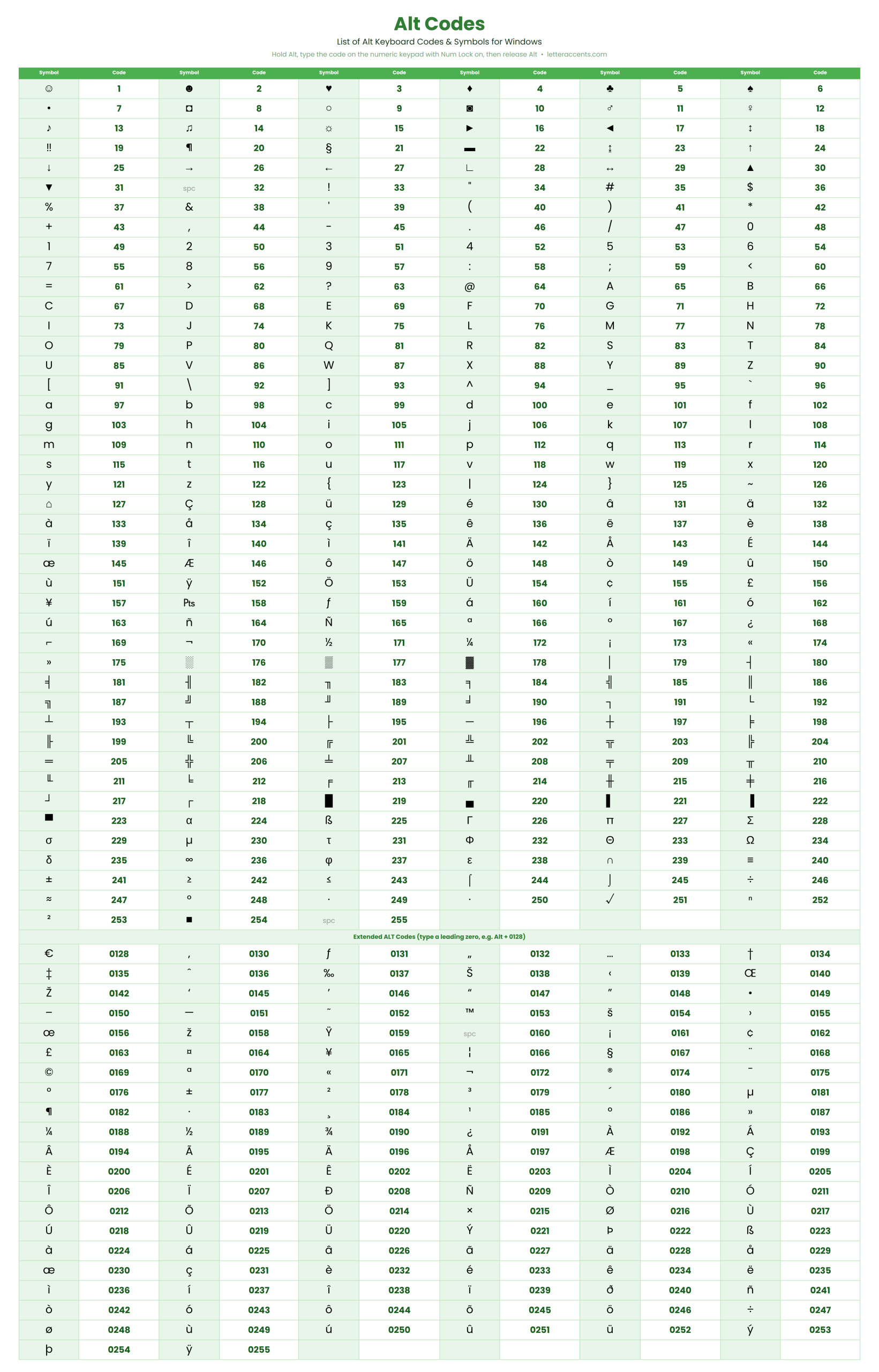
Web browsers do not always show a direct “Print” option when you right-click an online image. Use these steps instead:
• Open in a new tab: Right-click the image on the webpage and select Open image in new tab.
• Use shortcut: Press Ctrl + P (Windows) or Cmd + P (Mac) to open the print menu.
• Alternative (Save): Right-click the image, select Save image as, open the saved file from your computer, and use the right-click Print method.
How to Type an Alt Symbol on the Keyboard
Typing an Alt symbol is the same three step process in every Windows app (Word, Excel, Chrome, Notepad, and more): press and hold Alt, type the number on the numeric keypad, release Alt. For Unicode characters above 255, enable hexadecimal input, then hold Alt, press the plus (+) key on the numpad, and type the hex code. In Microsoft Word you can also type the hex code and press Alt + X.
Keyboard Shortcuts on Windows vs Apple (iOS and macOS)
Windows uses Alt codes with the numeric keypad. Apple devices do not use Alt codes at all. On a Mac, hold the Option key (sometimes labeled Alt) for one symbol, for example Option + g gives the copyright symbol, or Option + 2 gives the trademark symbol. Accents on Mac use Option plus a letter, then the vowel, for example Option + e then e gives e with an acute accent. On an iPhone or iPad, press and hold a letter on the on-screen keyboard to see accent options. Copy and paste works on every device.
Frequently Asked Questions About Alt Codes
Why are my Alt codes not working?
The most common reason Alt codes do not work is that Num Lock is off or you are using the number row instead of the numeric keypad. Turn on Num Lock, use the separate keypad on the right, hold Alt the whole time you type the digits, and release Alt only at the end. If codes still fail, your laptop may not have a numpad, or an app may be intercepting the Alt key, so try the On-Screen Keyboard, Character Map, or copy and paste instead.
How do I use Alt codes on a laptop without a number pad (numpad)?
On a laptop without a numpad, hold Fn + Alt and use the hidden embedded number keys, usually the second-color digits printed on the M, J, K, L, U, I, O, 7, 8, 9 keys. If your laptop has no embedded numpad or Num Lock key, use the Windows On-Screen Keyboard (search osk), the Character Map tool (charmap.exe), or simply copy and paste the symbol from the tables on this page, which is the fastest method.
Why do Alt codes not work with my external USB or Bluetooth numpad?
Windows requires the Alt key and the number keys to be on the same physical device. When you hold Alt on your laptop keyboard and press numbers on a separate USB or Bluetooth numpad, Windows does not combine them, so nothing happens. Workarounds include an AutoHotkey remap, pressing Alt on the external numpad itself if it has one, or using copy and paste.
Do I need Num Lock on to use Alt codes?
Yes. Num Lock must be turned on so the numeric keypad sends number input rather than arrow or navigation commands. If Num Lock is off, Alt + 4 can be read as Alt + Left Arrow and send your browser back a page instead of typing a symbol.
What is the difference between Alt codes with and without a leading zero?
Codes without a leading zero (Alt + 1 to Alt + 255) use the old OEM character set, Code Page 437, and produce symbols like hearts and smiley faces. Codes with a leading zero (Alt + 0128 to Alt + 0255) use the Windows ANSI set and produce accented letters, currency signs, and typographic marks. The same number can give two different characters depending on the leading zero.
Why does Alt + 3 (heart) or other codes under 32 not work in some programs?
Codes below 32 are control characters in some applications, so an app like Notepad++ or a web form may ignore them or show a question mark. Try the four digit version with leading zeros (Alt + 0003), test in plain Notepad or WordPad, or copy and paste the heart symbol directly from the Hearts table above.
Do Alt codes work on a Mac?
No, Windows Alt codes do not work on macOS. Macs use the Option key instead. For example, Option + e then a gives a with an acute accent, Option + g gives the copyright symbol, and Option + 2 gives the trademark symbol. The easiest cross-platform method is to copy and paste the symbol, which works the same on Mac, Windows, and mobile.
Do Alt codes work on a Chromebook or ChromeOS?
ChromeOS does not use Windows Alt codes. On a Chromebook, use Ctrl + Shift + u, then type the four character hex Unicode value and press Enter or Space, or simply copy and paste the symbol from this page.
How do I type an Alt code using letters (hexadecimal Unicode)?
To enter Unicode characters beyond the basic 255, enable hexadecimal numpad input in the Windows registry (EnableHexNumpad), then hold Alt, press the plus (+) key on the numeric keypad, and type the hex code using the number keys and the A to F letter keys. In Microsoft Word you can skip the registry edit and type the hex code, then press Alt + X.
Why does pressing Alt and a number open a menu instead of a symbol?
Some programs reserve the Alt key for their own menus and shortcuts, so Alt plus a number triggers a menu rather than a symbol. Try the app in a plain text field, use copy and paste, or use the Character Map tool to insert the character instead.
How many characters can Alt codes type?
Standard Alt codes reach the first 256 characters of the code page. For anything beyond that, such as colored emojis or less common Unicode symbols, use hexadecimal Unicode input, the Character Map, or copy and paste, which has no limit.
Why do my Alt codes produce the wrong character?
A wrong character usually means you left out or added a leading zero, or your system is using a different code page or keyboard language. Double check whether the code needs a leading zero, confirm your keyboard language setting, and if it still differs, copy and paste the exact symbol from the table above.
What is the Alt code for a check mark?
The check mark (tick) is Alt + 10003 for a thin check mark and Alt + 10004 for a heavy check mark, entered using hexadecimal or Unicode input. Because these are high Unicode values, the simplest method is to copy and paste the check mark from the Check Marks table on this page.
How do I type the degree symbol with an Alt code?
The degree symbol is Alt + 0176 or Alt + 248 on Windows. Hold Alt, type the code on the numeric keypad, then release Alt. On a Mac use Option + Shift + 8, or copy and paste the degree symbol from the Math table above.
How do I type the Euro or Pound sign?
The Euro sign is Alt + 0128 and the Pound sign is Alt + 0163 on Windows. On a Mac the Euro is Option + Shift + 2 and the Pound is Option + 3. You can also copy and paste either currency sign from the Money table above.
How do I type accented letters like e with acute, n with tilde, or u with umlaut?
On Windows use the extended Alt codes: Alt + 0233 for e with acute, Alt + 0241 for n with tilde, and Alt + 0252 for u with umlaut, typed on the numeric keypad with Num Lock on. On a Mac use Option + e then the vowel for acute accents, and Option + u then the vowel for umlauts. Copy and paste works everywhere.
Can I use Alt codes in Word, Excel, and Google Docs?
Alt codes work in Microsoft Word, Excel, and most Windows programs. In Google Docs, standard Alt codes also work on Windows for the basic set, and you can use Insert then Special characters for anything else. On any platform, copy and paste from this page is the reliable fallback.
How do I copy and paste a symbol instead of using an Alt code?
Click any symbol on this page and it is copied to your clipboard instantly, then press Ctrl + V (Windows) or Command + V (Mac) to paste it anywhere. This is the fastest method and needs no numeric keypad, no Num Lock, and no code to memorize.